The activity feed
The project drawer is the window’s right-hand column, and it holds one thing: a feed of what Nightdesk has watched happen. It is not a list of your projects, checkouts, worktrees or pull requests. It is events, one row each, newest at the bottom.
The bar’s Activity control shows and hides the drawer, and so does ⌥⌘0.
What it narrates
Section titled “What it narrates”- Issues starting and closing.
- Pull requests opening, and review rounds ending, each with the verdict it ended on.
- Test runs, passing and failing.
- Agents changing state, restarting, and updating.
- Previews an agent delivered to you: an image, a clip or a PDF.
- A prompt arriving at a session, as New request.
A New request row records a prompt arriving at a session rather than something the session did, and it records that the prompt was submitted, not who wrote it — a background session launched by another agent produces the same row. It names an event rather than a state, which is why it stays on the feed instead of being replaced. Like the restart and update rows, it never lights the unseen dot and never moves an agent up the rail: those two signals exist to tell you an agent has done something, and something arriving at an agent is not that.
How it follows your selection
Section titled “How it follows your selection”- An agent selected — that agent’s events, plus the events from its checkout that belong to no one agent, such as a test run.
- A checkout selected, with no session of its own — everything from that checkout.
- Concierge selected — the whole fleet.
Switching agents always lands you at the bottom of the new feed.
Reading it
Section titled “Reading it”The newest row is at the bottom, like a chat log. The feed sits pinned there and follows new rows down as they arrive. Scroll up and your place holds while new rows land silently below; scroll back to the bottom and it re-pins itself.
A row is an icon, a message, a caption and the time it happened. The icon is tinted with the same status colors the rail uses. The caption names what the event belongs to, and leads with a glyph saying which kind of thing that is — a chip for an agent, a folder for a checkout or a repository — because an agent and its checkout can have the identical name.
A row carries the bare time, whatever day it happened on. The exception is a history row — one stamped from before Nightdesk started — which can predate today: those carry the date, as in Jul 31, 3:05 PM, and the year as well when the stamp falls in an earlier year.
Which rows open a page
Section titled “Which rows open a page”Some rows are buttons:
- a pull request row opens the pull request,
- an issue row opens the issue,
- an image row opens the preview that was delivered.
Each opens as a tab on the session the event belongs to, so clicking a row in the fleet-wide feed takes you to the agent it happened on. An event that belongs to Concierge opens there. If there is no agent left to host it, a pull request or issue row opens in your browser instead of doing nothing.
Status changes have no page to open and stay plain, and neither does a ticked-off todo — an item
marked done in a checkout whose task list is a todo.md file rather than GitHub issues, so there
is no issue behind it to open.
Test runs
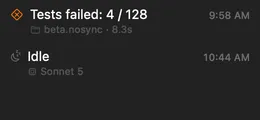
Section titled “Test runs”A test run reads Tests passed: 584 or Tests failed: 4 / 128, beside a diamond icon — checked when the run passed, crossed when it failed. The checkout, any skipped tests and how long the run took are on the caption line.
Because the feed is a record of events, nothing about tests appears until a run finishes while Nightdesk is running. For the current state of every checkout — which ones are failing right now — read the warnings strip at the foot of the rail instead, which lists failing checkouts only.
Where there is nothing to report, Nightdesk says nothing: a checkout whose results it cannot find gets no row, and a run that executed no tests and failed none is not a result. The one case that does speak up is a results file Nightdesk can find but cannot read, which becomes a warning in the strip — a broken setup should not look like no setup.
What the feed remembers
Section titled “What the feed remembers”The feed records what Nightdesk watches happen while it is running. Starting Nightdesk does not replay the past: whatever it finds already true at launch becomes the quiet starting point, not a burst of rows.
There is one exception. Agents that are already working on an issue when Nightdesk starts arrive as history, stamped with when they actually claimed it. Those rows do not light the unseen dot and do not reorder the rail, because you have not missed anything.
The feed lives in memory for as long as Nightdesk is running and holds the most recent 200 rows; older rows fall off the top. Quitting clears it.